
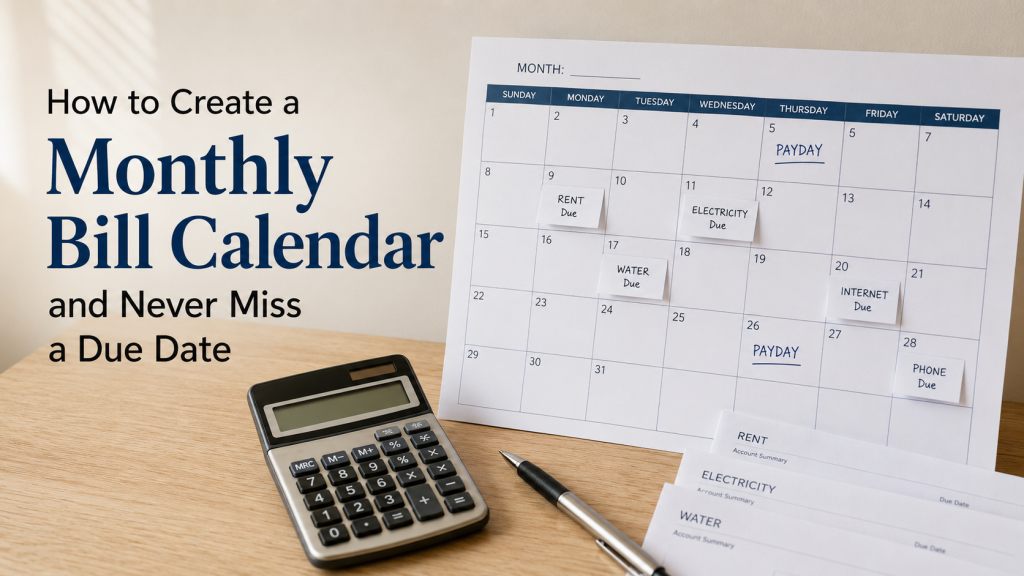
How to Create a Monthly Bill Calendar and Never Miss a Due Date
Learning how to create a monthly bill calendar can make it much easier to see exactly when money needs to leave your account.
A list of monthly bills tells you what you owe.
A bill calendar tells you when each payment needs to happen.
That difference matters.
You may have enough income to pay every bill during the month but still run short if several payments are due within the same few days.
A simple bill calendar puts your:
- Paydays
- Due dates
- Fixed bills
- Variable bills
- Debt payments
- Automatic payments
in one place.
Use the Bill Tracker Printable PDF alongside your calendar to record expected amounts, actual payments, and whether each bill has been paid.
What Is a Monthly Bill Calendar?
A monthly bill calendar is a calendar that shows when your recurring financial obligations are due.
Instead of writing:
- Rent — $1,000
- Electricity — $150
- Phone — $85
- Insurance — $140
you also place each expense on its actual date.
For example:
- September 3 — Rent — $1,000
- September 7 — Electricity — $150
- September 11 — Phone — $85
- September 16 — Insurance — $140
Now you can immediately see how expenses are distributed throughout the month.
Why a Bill Calendar Helps
Suppose you receive:
$1,700 on September 4
and:
$1,700 on September 18
Your monthly income is:
$3,400
Your monthly expenses are only:
$3,100
That sounds manageable.
But suppose the calendar shows:
- September 5 — Rent: $1,000
- September 8 — Electricity: $160
- September 10 — Phone: $90
- September 14 — Insurance: $150
- September 15 — Credit card: $100
Total before the second paycheck:
$1,500
Now add groceries and transportation.
The problem becomes visible immediately.
Without a calendar, you may only realize this after the first paycheck is already spent.
How to Create a Monthly Bill Calendar
Step 1: Choose Your Calendar
You can use:
- Printed monthly calendar
- Budget planner
- Wall calendar
- Digital calendar
- Spreadsheet
- Notebook
- Phone calendar
The format matters less than being able to see the entire month at once.
For budgeting purposes, a simple monthly grid often works best.
Step 2: Add Every Payday First
Before adding bills, mark your income dates.
For example:
PAYDAY — September 4
PAYDAY — September 18
If you have several income sources, include all of them.
Examples:
- Salary
- Partner income
- Freelance income
- Benefits
- Pension
- Child support
- Side income
Do not add uncertain income as guaranteed money.
Only include deposits you realistically expect.
Step 3: List Every Recurring Bill
Gather your bills before filling the calendar.
Examples include:
- Rent or mortgage
- Electricity
- Gas
- Water
- Phone
- Internet
- Insurance
- Car payment
- Credit cards
- Loans
- Childcare
- Subscriptions
- Memberships
Use the Bill Tracker Printable PDF to create a master bill list before transferring the due dates to your calendar.
Step 4: Add the Exact Due Date
Do not write every bill on the first day of the month.
Use the actual due date.
For example:
September 3
Rent — $1,000
September 8
Electricity — $150
September 12
Phone — $85
September 18
Car insurance — $140
September 25
Internet — $70
The calendar should show when the bill actually requires attention.
Step 5: Mark Automatic Payments
Automatic payments are easy to forget because you do not manually pay them.
Mark them clearly.
For example:
AUTO — Internet — $70
AUTO — Streaming — $15
AUTO — Insurance — $140
This prevents an automatic withdrawal from unexpectedly lowering your account balance.
Step 6: Add Expected Amounts
Whenever possible, write the amount next to the due date.
Example:
Sep 8 — Electricity — $150
For bills that change every month, use a realistic estimate.
Suppose recent electricity bills were:
- $135
- $148
- $160
- $152
Instead of writing:
$135
consider budgeting:
$155–$160
depending on the season.
Read How to Budget for Bills That Change Every Month for a more detailed method.
Step 7: Use Different Marks for Paydays and Bills
Keep the calendar easy to scan.
For example:
- PAYDAY
- BILL
- AUTO
- PAID
You do not need a complicated color system.
The goal is to recognize important dates instantly.
Step 8: Circle Heavy Bill Periods
Look for areas where many bills are grouped together.
For example:
September 3–12
- Rent: $1,000
- Electricity: $150
- Phone: $85
- Insurance: $140
Total:
$1,375
September 20–28
- Internet: $70
- Car payment: $280
- Debt payment: $100
Total:
$450
This shows that the beginning of the month is much more expensive.
Now you can plan for that imbalance before the month starts.
Step 9: Assign Bills to Paychecks
Once the calendar shows both paydays and bills, connect them.
For example:
Paycheck 1
Covers:
- Rent
- Electricity
- Phone
- Groceries
- Fuel
Paycheck 2
Covers:
- Insurance
- Internet
- Debt
- Groceries
- Fuel
- Future rent reserve
Use the Paycheck Budget Planner Printable to turn the calendar into an actual paycheck plan.
For the full method, read How to Plan Bills Around Your Paychecks.
Step 10: Check Bills Due Before Payday
Your bill calendar makes this problem obvious.
Suppose:
Electricity due — September 12
Next payday:
September 18
You cannot wait for the September 18 paycheck.
The money needs to come from:
- An earlier paycheck
- A bill reserve
- Money already set aside
Read How to Budget for Bills Due Before Payday if this happens regularly.
Step 11: Add Weekly Spending Around the Bills
Bills are not your only expenses.
Between due dates you still need money for:
- Groceries
- Fuel
- Household supplies
- School needs
- Personal spending
Suppose a two-week paycheck period has:
$500 available after bills
Do not spend it all during the first few days.
You could plan:
- Week 1: $260
- Week 2: $240
Use the Weekly Budget Planner Printable to protect later-week spending.
Step 12: Mark Bills as Paid
Once a payment is completed, mark:
PAID
on the calendar.
This gives you a simple visual confirmation.
It also prevents situations where you wonder:
Did I already pay this bill?
If a payment is automatic, wait until the transaction actually appears before marking it complete.
A Simple Monthly Bill Calendar Example
Suppose your month looks like this:
September 1
Rent — $1,000
September 4
PAYDAY — $1,700
September 7
Electricity — $150
September 10
Phone — $85
September 14
Insurance — $140
September 18
PAYDAY — $1,700
September 20
Internet — $70
September 24
Credit card — $100
September 27
Car payment — $280
Now you can immediately see:
- Which bills occur before each paycheck
- Which paycheck needs more money
- Where a reserve is necessary
- When everyday spending needs to be lower
Add Bills That Do Not Happen Every Month
Some expenses happen:
- Quarterly
- Every six months
- Annually
Examples:
- Car insurance
- Property taxes
- Membership fees
- Registration
- Annual subscriptions
Add these to the month in which they are due.
But do not wait until that month to begin saving.
For example:
Annual insurance:
$600
Monthly sinking-fund contribution:
$600 ÷ 12 = $50
Use the Sinking Fund Tracker Printable to save gradually.
Add Irregular Expenses
Not every expense has an official due date.
But predictable irregular expenses can still be placed on the calendar.
Examples:
- School supplies
- Birthdays
- Holidays
- Car maintenance
- Annual medical appointments
- Seasonal home expenses
Read How to Save for Irregular Expenses to prepare for them in advance.
What if Most Bills Are Due at the Beginning of the Month?
This is one of the biggest advantages of creating a bill calendar.
You can see the problem before the first day arrives.
Suppose bills due between the 1st and 10th total:
$1,600
But your first paycheck is only:
$1,700
That leaves almost nothing for groceries or transportation.
Possible solutions include:
- Reserve part of the bills from the previous paycheck
- Split large bills between paychecks
- Change eligible due dates
- Build a paycheck buffer
- Get one bill ahead
- Reduce optional spending
Do not wait until the first week to discover the problem.
Should You Change Bill Due Dates?
Sometimes.
Suppose almost every bill appears between the 1st and 15th.
You may be able to move:
- Credit card due date
- Phone bill
- Internet
- Insurance
- Loan payment
to the second half of the month.
Not every provider allows this.
But moving even one or two larger bills can improve cash flow.
Create a Bill Calendar Before Every New Month
A good time to do this is:
3–7 days before the month begins.
Check:
- Paydays
- Bill due dates
- Expected amounts
- Automatic payments
- Irregular expenses
- Five-week months
- Holidays
- Travel
- School events
Then create your monthly budget.
Use Last Month to Improve the New Calendar
Review what happened.
Ask:
- Did any bill change dates?
- Was any amount higher than expected?
- Did I forget a subscription?
- Was a bill paid late?
- Did one paycheck have too many expenses?
- Did I need money before payday?
Use those answers to improve the next calendar.
Add a Budget Buffer
Suppose your bills and normal expenses total:
$3,100
Monthly income:
$3,250
Difference:
$150
Do not automatically spend the $150.
You might create:
Budget Buffer — $100
and leave:
$50
for another goal.
Read How to Build a Budget Buffer for a system that handles small monthly surprises.
Use the Calendar to Prepare for a 5-Week Month
A monthly calendar can also reveal an extra spending week.
Suppose the month contains:
- Week 1
- Week 2
- Week 3
- Week 4
- Week 5
That may require additional:
- Groceries
- Fuel
- Household money
- Personal spending
Read How to Budget for a 5-Week Month before the extra week arrives.
Bill Calendar When Paid Weekly
Weekly pay makes the calendar especially useful.
Suppose rent is:
$1,200
Instead of finding the entire amount at once, reserve:
$300 from four weekly paychecks
Mark each contribution on your calendar.
By the due date:
$1,200
is available.
Read How to Budget When Paid Weekly for the complete system.
Bill Calendar When Paid Biweekly
With biweekly income, start by marking every payday.
Then draw an imaginary line from each paycheck to the next.
Everything occurring between those dates needs funding.
Use the Biweekly Budget Planner Printable to divide each paycheck into bills, Week 1 spending, Week 2 spending, savings, and money remaining.
Bill Calendar When Money Is Tight
When income barely covers expenses, the calendar becomes even more important.
Prioritize:
- Housing
- Essential utilities
- Food
- Work transportation
- Healthcare
- Insurance
- Minimum required debt payments
- Other essential bills
- Optional spending
Use the Low Income Budget Planner if the calendar shows that essential expenses exceed your available income.
A Bill Calendar Is Not the Same as a Budget
The calendar answers:
When is the money needed?
The budget answers:
How much money can I spend?
You need both.
For example:
Calendar
September 8:
Electricity — $150
Budget
Utilities category:
$250 total for the month
The two systems work together.
A Bill Calendar Is Not a Bill Tracker
They also serve different purposes.
Bill calendar
Shows:
- Due dates
- Paydays
- Timing
Bill tracker
Shows:
- Bill name
- Planned amount
- Actual amount
- Payment status
- Notes
Using both provides a much clearer picture than either one alone.
Common Monthly Bill Calendar Mistakes
Forgetting Paydays
The calendar should show both income and expenses.
Writing Bills Without Amounts
Include the expected cost whenever possible.
Forgetting Automatic Payments
Automatic does not mean invisible.
Ignoring Variable Bills
Use realistic estimates.
Adding Only Fixed Bills
Include debt payments and irregular obligations too.
Never Checking the Calendar
Review it at least once per week.
Marking a Bill Paid Too Early
Confirm the payment actually processed.
Creating the Calendar After the Month Starts
Prepare it before the new month whenever possible.
Ignoring Next Month
The final paycheck this month may need to cover bills due early next month.
Download the Free Bill Tracker
The printable Bill Tracker helps you:
- List every monthly bill
- Record due dates
- Track expected amounts
- Compare planned and actual costs
- Mark payments complete
- Organize bills by paycheck
- Track annual and irregular bills
- Review each month
Use the tracker to create your master bill list, then transfer the due dates onto your monthly calendar.
Explore more free budget templates and printable PDF trackers for paychecks, weekly budgets, expenses, debt, emergency savings, and sinking funds.
Frequently Asked Questions
What should I put on a monthly bill calendar?
Add every payday, bill due date, expected bill amount, automatic payment, debt payment, and important irregular expense.
When should I create my bill calendar?
Ideally, create or update it several days before the new month begins.
Should I include automatic payments?
Yes. Automatic withdrawals still reduce your available bank balance and should be visible on the calendar.
What if most bills are due before my paycheck?
Reserve money from an earlier paycheck, split large bills, or consider changing eligible due dates.
Is a bill calendar the same as a budget?
No. The calendar shows when money is needed, while the budget determines how much money is available.