
Expense Tracker Printable PDF for Monthly Spending
An expense tracker printable PDF helps you record what you actually spend instead of relying on memory or checking your bank balance at the end of the month.
Small purchases can be easy to ignore. Groceries, delivery fees, subscriptions, snacks, fuel, online shopping, and personal expenses may not seem serious individually, but together they can use a large part of your monthly budget.
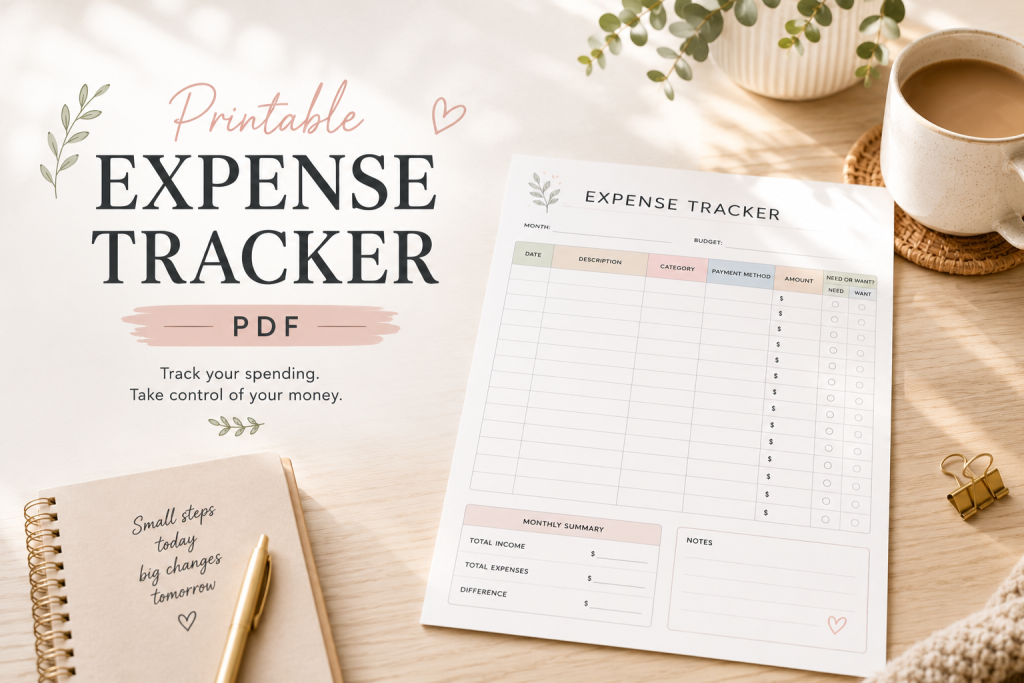
The free printable expense tracker on this page gives you one clear place to record purchases, organize spending categories, and compare your real expenses with your budget.
Before tracking individual purchases, use the Simple Budget Planner to create a basic monthly plan for your income, bills, savings, and spending limits.
What Is an Expense Tracker?
An expense tracker is a budgeting tool used to record money after it has been spent.
For each purchase, you can write down:
- Date
- Description
- Spending category
- Amount
- Payment method
- Whether it was a need or a want
- Additional notes
A budget tells you what you plan to spend. An expense tracker shows what actually happened.
Both tools are important because a budget cannot improve unless you compare your planned amounts with your real spending.
Why Tracking Expenses Matters
Many people know how much their major bills cost but do not know how much they spend on smaller everyday purchases.
For example, you may remember paying rent and utilities, but forget about:
- Coffee or snacks
- Delivery charges
- Small online purchases
- App subscriptions
- Convenience-store visits
- Extra grocery trips
- Parking fees
- Children’s purchases
- Household items
- Unplanned personal spending
Tracking these expenses makes your spending visible.
It can help you:
- Understand where your money goes
- Identify unnecessary spending
- Compare planned and actual expenses
- Find categories that regularly go over budget
- Prepare a more realistic budget next month
- Reduce impulse purchases
- Increase savings
- Avoid running out of money before payday
A Realistic Monthly Expense Example
Imagine that your monthly budget includes these limits:
- Groceries: $500
- Transportation: $250
- Eating out: $120
- Household supplies: $100
- Personal spending: $150
Your total planned flexible spending is:
$1,120
At the end of the month, your expense tracker shows:
- Groceries: $548
- Transportation: $232
- Eating out: $186
- Household supplies: $84
- Personal spending: $137
Your actual total is:
$1,187
Difference:
$1,187 − $1,120 = $67 over budget
The tracker shows that groceries were $48 over budget and eating out was $66 over budget.
Lower spending in transportation, household supplies, and personal spending reduced part of the problem, but the total was still $67 higher than planned.
Without an expense tracker, you may only notice that your bank balance is lower than expected. With the tracker, you can see exactly which categories caused the difference.
How to Use the Expense Tracker Printable
Step 1: Choose the Tracking Period
Decide whether you will use the tracker for:
- One month
- One paycheck period
- One week
- A specific category
For most beginners, monthly tracking gives the clearest overview.
Write the month and starting budget at the top of the page.
Step 2: Record Every Purchase
Each time you spend money, record:
- The date
- What you purchased
- The category
- The amount
- How you paid
Do not record only large expenses.
A $4 snack, $7 delivery fee, or $12 online purchase still affects the amount remaining in your budget.
Step 3: Use Simple Categories
Do not make the tracker unnecessarily complicated.
Useful categories include:
- Housing
- Utilities
- Groceries
- Transportation
- Household
- Personal
- Eating out
- Entertainment
- Healthcare
- Children
- Debt
- Other
Use categories that match your real spending.
Step 4: Mark Needs and Wants
The printable includes a “Need or Want” column.
A need is an expense required for daily life, health, work, housing, or essential family responsibilities.
A want is optional spending that could be delayed or reduced.
This does not mean all wants are bad. The purpose is to understand which purchases are flexible when you need to reduce spending.
Step 5: Update the Tracker Regularly
You can update the tracker:
- Immediately after each purchase
- At the end of every day
- Every two or three days
- Once per week
If you frequently forget purchases, update it daily.
If you mostly use a debit or credit card, review your bank transactions and add anything you missed.
Step 6: Add Category Totals
At the end of each week or month, calculate how much you spent in each category.
Compare the result with the original budget.
For example:
- Grocery budget: $450
- Actual grocery spending: $482
- Difference: $32 over budget
The difference shows whether your spending limit was realistic.
Step 7: Review the Month
At the end of the month, ask:
- Which category cost the most?
- Which category was over budget?
- Which purchases were unnecessary?
- Which expenses were unexpected?
- What can I reduce next month?
- Which limit needs to become more realistic?
- How much money remained?
Use these answers to improve the next budget.
How Often Should You Track Expenses?
The best schedule is one you can maintain consistently.
Daily tracking is useful if:
- You make many small purchases
- You often forget what you bought
- Overspending is a serious problem
- You use cash frequently
- You are trying to change a spending habit
Weekly tracking may be enough if most purchases appear clearly in your bank account.
For closer control over short-term spending, use the Weekly Budget Planner Printable to plan and review expenses every seven days.
Expense Tracker vs Budget Planner
A budget planner creates a spending plan before the month begins.
An expense tracker records purchases after they happen.
For example, your budget may say:
- Planned groceries: $450
Your expense tracker may show:
- Actual groceries: $487
The difference is:
$487 − $450 = $37 over budget
The budget gives you a target. The expense tracker gives you the result.
Use both together for the clearest financial picture.
Tracking Expenses Between Paychecks
If you often run out of money before payday, organize expenses according to each paycheck period.
First reserve money for bills and essential costs.
Then track how much of the remaining amount is used for:
- Groceries
- Transportation
- Household expenses
- Personal purchases
- Eating out
- Other flexible spending
Use the Paycheck Budget Planner Printable to decide how much each paycheck must cover before you begin tracking purchases.
This prevents bill money from being mistaken for available spending money.
What to Do When Spending Is Over Budget
Do not stop tracking because one category is already over budget.
Continue recording expenses until the end of the period.
Then decide whether you need to:
- Reduce another flexible category
- Use part of your budget buffer
- Pause optional purchases
- Increase an unrealistic category next month
- Prepare a sinking fund for predictable expenses
- Find a less expensive alternative
An expense tracker should provide information, not guilt.
The goal is to understand the problem clearly enough to make a better decision.
Common Expense-Tracking Mistakes
Recording Only Large Purchases
Small expenses can create a large total.
Record every purchase, not only bills and major shopping trips.
Waiting Until the End of the Month
It is difficult to remember several weeks of spending.
Update the tracker regularly.
Creating Too Many Categories
Too many categories make tracking slower and harder to maintain.
Start with broad categories and add detail only when it helps.
Ignoring Cash Purchases
Cash expenses may not appear in your bank account.
Record them immediately or keep the receipt until you update the tracker.
Stopping After Overspending
Continue tracking even after a category exceeds its limit.
You need the complete result to plan the following month accurately.
Download the Free Expense Tracker Printable PDF
Use this printable to:
- Record daily purchases
- Organize expenses by category
- Track payment methods
- Separate needs from wants
- Calculate category totals
- Compare spending with your budget
- Review where your money went
- Plan realistic changes for next month
Print the monthly overview first. Use additional daily expense pages when you need more rows.
You can also explore more free budget templates and printable money trackers for monthly budgeting, weekly planning, low-income budgets, savings, debt, and bill tracking.
Frequently Asked Questions
What should I include in an expense tracker?
Record the date, description, category, amount, payment method, and whether the purchase was a need or a want.
Should I track every expense?
Yes, especially when you are trying to understand overspending. Small purchases can add up to a significant monthly amount.
How often should I update my expense tracker?
Daily or every few days is best. At minimum, update it once per week.
Can I use an expense tracker without a budget?
Yes, but it is more useful when you compare actual spending with planned category limits.
What should I do if I spend more than planned?
Continue tracking. Review which categories caused the difference and adjust spending or budget limits for the next period.
